Custom drinkware and hard-surface decoration have become important product categories for printing businesses serving promotional, gifting, retail, and branded merchandise markets. However, selecting a suitable UV DTF printer requires more than comparing headline speed figures. Buyers need to consider substrate compatibility, print width, production workflow, printhead configuration, curing performance, and operational stability before investing in equipment.
Start with the Materials and Products You Plan to Decorate
The first step is to define the intended application range. Custom drinkware often includes glass bottles, tumblers, cups, and other containers with curved or irregular surfaces. Businesses may also need to decorate metal, plastic, acrylic, wood, and other hard substrates.
A UV DTF printer can be useful for these applications because the design is produced on film and then transferred to the target surface. This approach can expand decoration possibilities where direct printing may be less practical, particularly for curved, uneven, or difficult-to-position items.
Buyers should therefore begin by reviewing the actual materials they expect to process. A printer that performs well for flat promotional items may not automatically support the same workflow requirements for varied drinkware shapes. The transfer film, adhesive system, curing process, and expected end-use conditions should all be considered.
Match UV DTF Printer Size to Production Requirements
Print width should correspond to the volume and size of the transfers a business plans to produce. A wider machine can provide greater capacity for larger graphics or multiple designs across a wider film area, while a narrower system may better suit operations with limited floor space and smaller-format transfer requirements.
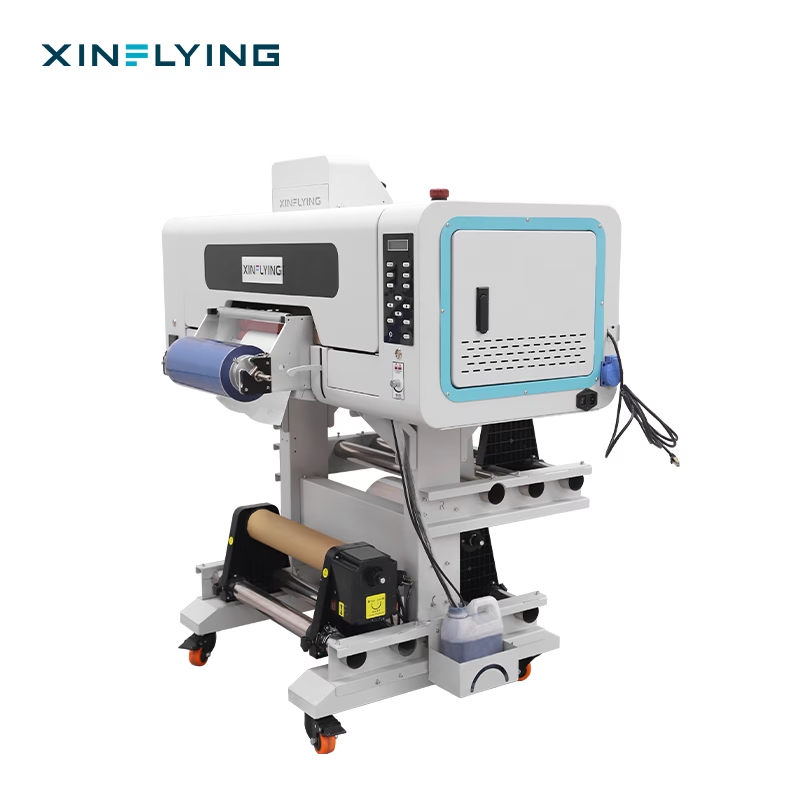
For example, the Xinflying XF-450S UV DTF printer has a 12-inch printing width. Its official specification lists a printing speed of 2.75 m²/h at 8-pass mode, making its capacity relevant to businesses that need a compact UV DTF production solution rather than a large-format industrial system.
When evaluating a UV DTF printer manufacturer, buyers should compare published productivity figures under the same print settings whenever possible. Pass mode, artwork complexity, maintenance routines, and production workflow can all affect practical output.
Evaluate Printhead Configuration and Image Detail
Printhead configuration directly influences how a machine handles production speed and image output. Buyers producing detailed logos, small text, gradients, and complex branded graphics should pay particular attention to the printer’s published printhead specifications.
The XF-450S uses three Epson printheads. The machine is designed for UV ink and supports a printing color configuration listed as CMYK FY FM RD OR+W+V.
For custom drinkware, fine details can be especially important because many orders involve logos, personalized names, decorative graphics, and small promotional elements. Before purchasing, businesses should review sample output based on their own artwork types rather than relying only on general claims about resolution.
Print consistency also depends on stable carriage movement and accurate motion control. Systems designed with precision motors and coordinated control components can help support repeatable positioning during production.
Consider the Complete Printing and Laminating Workflow
Equipment workflow can significantly influence labor requirements and production efficiency. Some UV DTF systems require separate stages or equipment for printing and laminating, while integrated configurations combine these functions within one machine.
The XF-450S is described by Xinflying as an integrated UV DTF printing and laminating system. Combining these processes in one compact machine can simplify the production flow for businesses producing crystal labels and UV DTF transfers.
However, buyers should still examine the complete workflow from artwork preparation through finished transfer application. Film loading, RIP software, curing, laminating, peeling, and final application all require time and operator attention.
The XF-450S officially supports A+B UV PET film. Its listed RIP software options include PrintFactory and Maintop as standard options, with RIIN, PhotoPrint, and CADlink available as optional software. Software compatibility should be reviewed alongside the company’s existing design and production workflow.
Check UV Curing and Adhesion Requirements
Curing performance is another important consideration when selecting a UV DTF printer for hard substrates. UV curing helps solidify the printed ink during production, while the overall transfer process contributes to the finished label’s adhesion on the target material.
The XF-450S uses air-cooled UV curing lamps. Xinflying states that the system is designed for rapid curing and strong label adhesion, with applications including glass, metal, plastic, acrylic, wood, and other surfaces.
Businesses should test representative substrates before making large purchasing commitments. Surface texture, coatings, cleanliness, curvature, and handling conditions can influence final transfer performance. Testing actual drinkware samples is more informative than assuming identical results across every material.
Prioritize Stability for Commercial Production
A UV DTF printer should also be evaluated as a production system rather than only as a printing device. Ink supply, printhead protection, alarms, and maintenance features can affect workflow continuity and reduce the risk of unexpected interruptions.
Xinflying lists printhead anti-collision protection, a large-capacity ink supply system, and a low-ink alarm among the XF-450S features. These functions are intended to support safer and more continuous operation during production.
The official specifications also list a machine size of L1300 × W1000 × H1450 mm, 1 kW power, and support for 220V/110V at 50Hz/60Hz. These details should be checked against available installation space and local electrical requirements.
Making a More Informed Equipment Decision
Choosing the right UV DTF printer for custom drinkware and hard substrates starts with matching equipment capabilities to actual business requirements. Buyers should examine the materials they decorate, expected order volume, transfer sizes, workflow preferences, image-detail requirements, curing needs, and available operating space.
For businesses seeking a compact configuration, the Xinflying XF-450S combines a 12-inch printing width, integrated printing and laminating, and a published output of 2.75 m²/h at 8-pass mode. These specifications provide concrete factors for comparison when discussing equipment needs with a UV DTF printer manufacturer.
Ultimately, the most effective purchasing process is based on verified specifications, application testing, and realistic production requirements. By evaluating the complete workflow rather than focusing on a single performance figure, business buyers can select a UV DTF printer that better aligns with their custom drinkware and hard-substrate business plans.