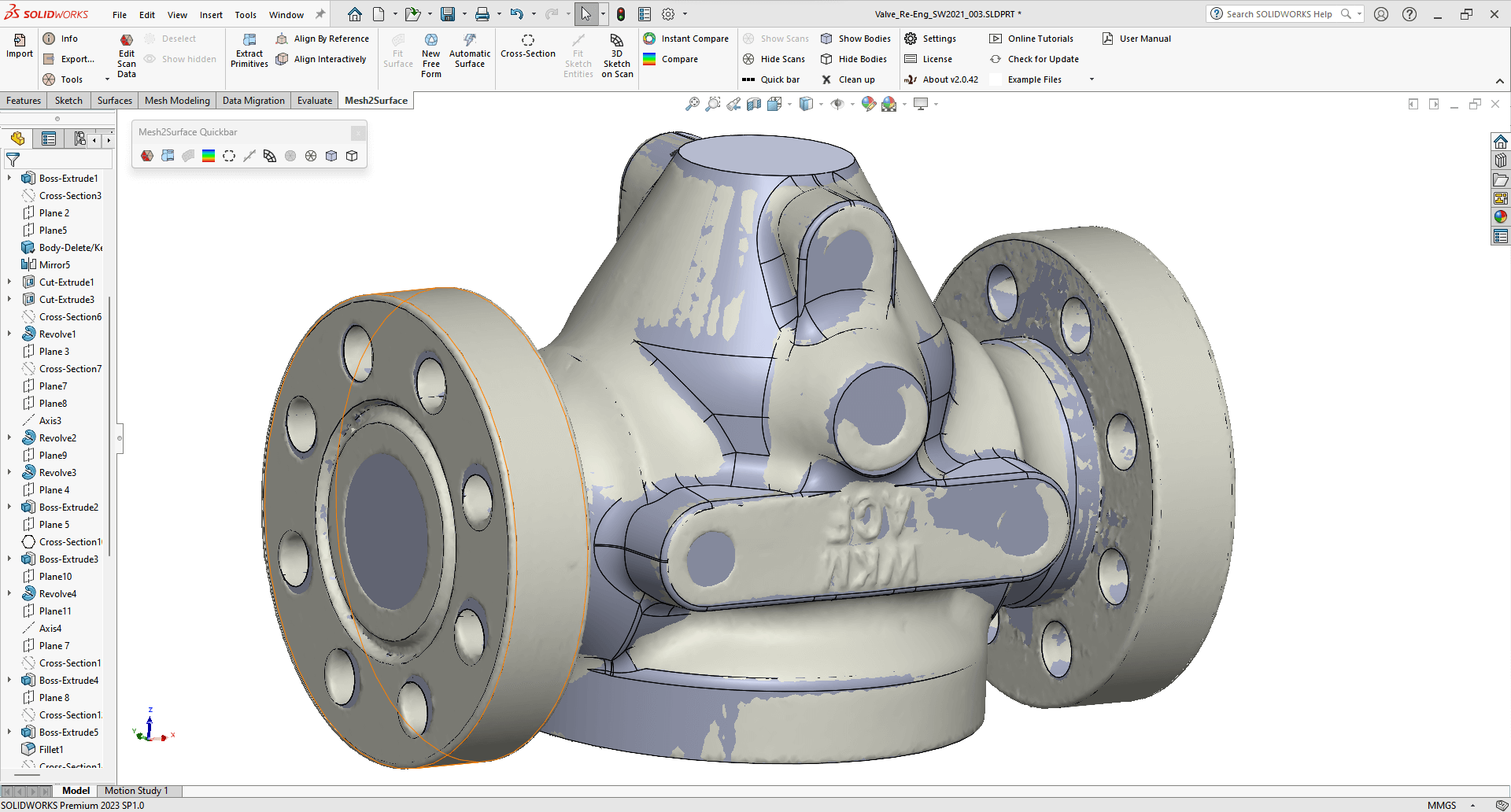
To manage a product’s lifecycle in the modern digital workflow, you often need two different types of software: traditional Computer-Aided Design (CAD) software and specialized 3D reverse engineering software. Both tools can make accurate three-dimensional models, but their basic ideas, functions, and ways of handling data are very different. Traditional CAD is a tool for making things that is meant to be used for design that looks ahead, while specialized 3D model reconstruction software is a tool for changing things that is meant to be used for interpreting existing physical objects. QUICKSURFACE is a key part of the 3DeVOK ecosystem, and it is an example of this specialized function. It has important features that regular CAD programs can’t match when it comes to turning high-fidelity scan data into models that can be made. To choose the right tool for any engineering job, you need to know what these differences are.
Core Philosophy: Making things vs. changing them
The fundamental distinction lies in their core design philosophies. Traditional CAD software is inherently parametric and constructive, building models from predefined parameters on a blank digital canvas. Users create features through mathematical definitions—specific line lengths, hole diameters, or perpendicular planes—forming a history tree of modifiable dimensions that consistently reflect predetermined design intent.
Conversely, 3D reverse engineering software operates through data interpretation. Its primary function involves analyzing static, imperfect digital representations of physical objects. Beginning with scanner-captured point clouds or meshes, the software intelligently reconstructs the original designer’s intended mathematical features. This retrospective process employs specialized algorithms to filter scanning noise and surface imperfections, enabling perfect geometric primitives to be fitted to imperfect data—effectively transforming physical reality into an editable, idealized mathematical model for engineering modification.
How to handle scan data and integrate meshes
Another big difference is that the software can natively handle and work with huge datasets made by 3D scanners. Traditional CAD software doesn’t work well with high-density polygon meshes (STL files), and it often has trouble importing, displaying, or manipulating them quickly. Some CAD programs let you import a mesh as a reference, but they don’t have the tools you need to clean, align, or segment the data well. Also, trying to model directly on the mesh is very hard and very wrong.
On the other hand, 3D model reconstruction software is designed to work best with this kind of data. The 3D reverse engineering software is built to handle meshes with millions of polygons. It has quick, responsive tools for Mesh Editing and Optimization. These tools can automatically fill in holes, remove outliers, smooth things out, and, most importantly, they have strong Registration and Alignment features. These features let the user quickly stitch together scans from different angles and perfectly align them using common geometric features or markers to make a single, watertight model. The first important step that regular CAD software can’t do well is to manage, clean, and align this messy real-world data.
Modeling Techniques: Parametric Control vs. Hybrid Flexibility
Traditional CAD relies on parametric modeling, organizing dimension-driven features into a history tree—ideal for new designs but inefficient for capturing complex organic shapes from scans.
In contrast, 3D reverse engineering software employs hybrid modeling to bridge this gap. It combines feature extraction for technical elements—automatically fitting primitives like holes and flanges to create parametric features—with free-form surfacing for organic shapes. Tools like QUICKSURFACE’s automatic surfacing rapidly generate editable NURBS surfaces that conform to scanned contours. This dual capability uniquely supports modeling real-world objects containing both precise mechanical and flowing aesthetic elements.
Validation and Quality Control: Built-in Measurement
Integrated validation capabilities are a key difference. Traditional CAD is great for seeing how a design will look, but it doesn’t have built-in metrology tools for checking it in the real world.
Professional 3D reconstruction software, on the other hand, builds quality control right into the workflow. Its Real-Time Deviation Analyzer makes color-coded maps all the time that show the differences in size between newly created CAD surfaces and original scan data. Engineers can keep manufacturing tolerances during the reconstruction process thanks to this immediate visual feedback.
The software also supports full Inspection Reports and universal export formats like STEP and IGES. This makes sure that models made with 3DeVOK hardware work well with quality assurance and manufacturing systems. This integrated metrology turns 3D reverse engineering software from a design tool into a full quality assurance solution.
Final thoughts
The main difference between traditional CAD and 3D reverse engineering software is what they do: CAD makes things from ideas, while reverse engineering software turns real things into ideas. Traditional CAD is still important for designing new products, but specialized platforms like QUICKSURFACE are necessary for dealing with the difficulties of high-density scan data, doing hybrid modeling, and checking accuracy against the real world. If you want to use 3D scanning in your professional workflow, the only way to turn raw data into a reliable, editable, and manufacturable CAD asset is to use dedicated 3D reverse engineering software.